
FreeBSD-native Network Attached Storage (NAS) management
RealNAS
RealNAS is a FreeBSD package set that adds NAS management to a stock system. It installs a middleware daemon, an Angular WebUI, and a small HTTPS reverse proxy for ZFS pools, datasets, snapshots, SMB and NFS shares, local users, alerts, reporting, updates, and boot environments.
RealNAS is a userspace management layer for FreeBSD. OpenZFS stores the data, Samba serves SMB, the FreeBSD NFS server handles NFS, and FreeBSD owns everything underneath. RealNAS adds the daemon, WebUI, and orchestration that turn those components into a NAS you can administer from a browser. The shell remains available, package bootstrap is explicit, and the files RealNAS writes live in documented places.
Install
# on a vanilla FreeBSD 15.x install
pkg install realnas-middleware realnas-webui
realnas-bootstrap
sysrc realnas_webui_enable=YES
service realnas_webui start

# then open https://<host>:4200 in a browser
realnas-bootstrap installs the offline wheelhouse, creates the SQLite schema, seeds first-boot state, generates the WebUI TLS certificate when needed, starts realnasd, imports existing FreeBSD users into middleware state, and enables reporting daemons. Updates run through a single atomic update.update transaction over freebsd-update, pkg, and bectl, with paired boot-environment and database rollback.
WebUI Workflow
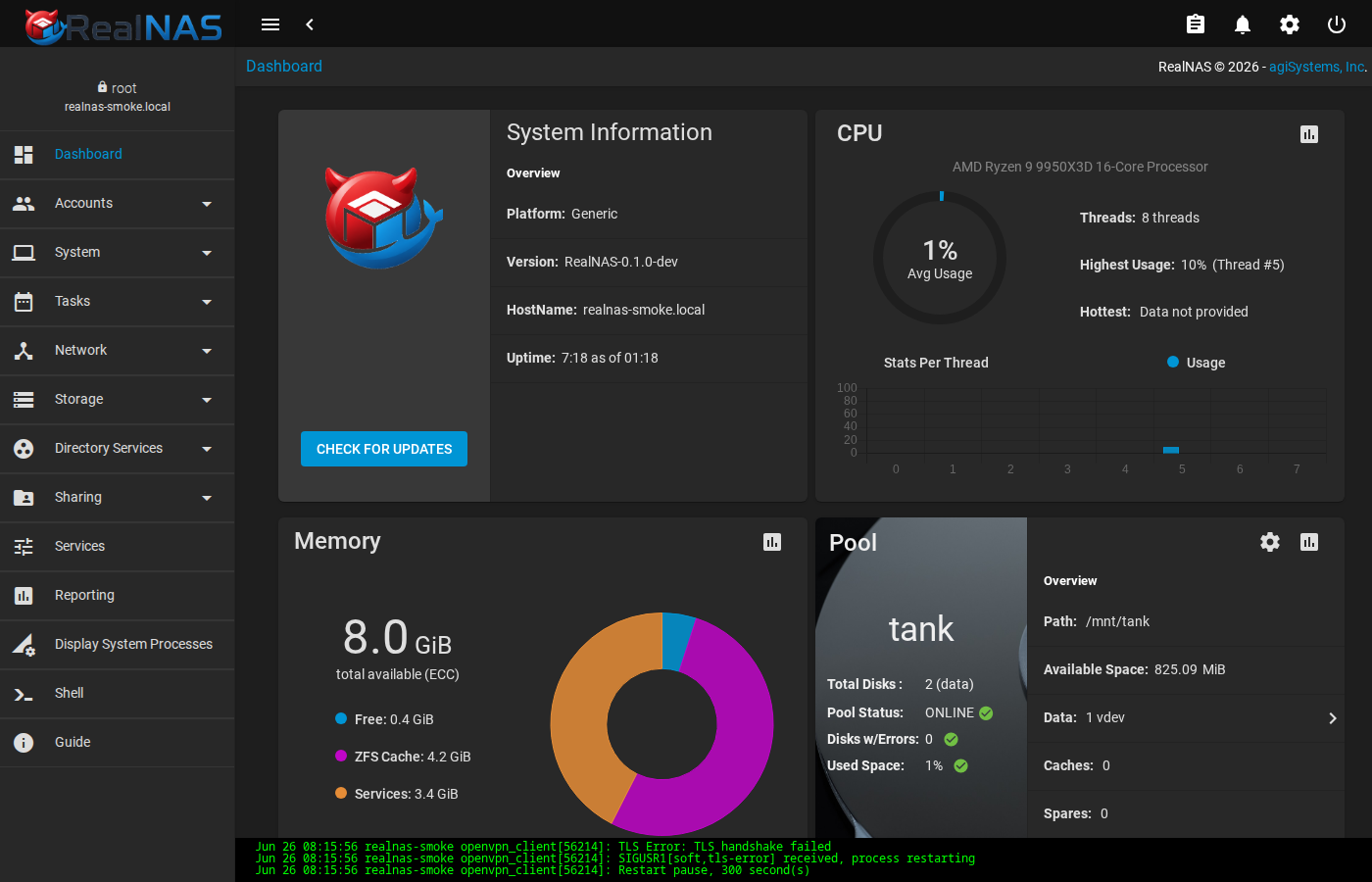
The Angular WebUI is the normal place to perform day-to-day NAS administration. Use the left sidebar for major domains: Dashboard, Accounts, System, Tasks, Network, Storage, Directory Services, Sharing, Services, Reporting, system processes, and shell access. Some inherited entries such as plugins, jails, virtual machines, failover, and KMIP are deferred or optional surfaces in the default RealNAS install; the manual calls out which workflows are core.
Most list pages use an Add button for new objects, row action menus for per-item operations, and breadcrumbs at the top of the page so you can see the current section. The top-right toolbar exposes job/clipboard state, alerts, settings, and session power/logout actions.
Primary Runtime
Install, bootstrap, verify
The operator path is pkg install, realnas-bootstrap, service realnas_webui start, then health checks from the shell.
Import existing pools
Unencrypted, native OpenZFS encrypted, and legacy GELI encrypted import paths have different handling and different rollback expectations.
Plan a migration → 3Know what owns state
FreeBSD owns OS configuration. RealNAS owns NAS orchestration state and generated service config behind documented adapters.
See the architecture →What it manages
- Storage
- ZFS pools, datasets, snapshots, periodic snapshot tasks, replication targets, and scrub schedules.
- File sharing
- SMB through Samba 4.x with ZFS ACL support; NFSv3/v4 through the FreeBSD NFS server.
- Identity
- Local users and groups, including UID/GID control for imported pools.
- Health
- SMART schedules, alert rules, SMTP notification, and syslog integration.
- System
- Boot environments with
bectl, updates withfreebsd-updateandpkg upgrade, WebUI TLS certificates, first-login setup, reporting, and SSH settings.
How it runs
OpenZFS stores the data. Samba and the FreeBSD NFS server provide network access. A Python middleware daemon exposes JSON-RPC and WebSocket APIs, keeps RealNAS-owned settings in SQLite under /var/db/realnas, and calls FreeBSD tools through named adapters for host changes.
The WebUI service listens on HTTPS port 4200 by default and proxies to the middleware loopback backend at 127.0.0.1:6000. Middleware Unix sockets are root-owned, and wildcard middleware API exposure is an explicit operator choice in rc.conf.
ZFS stays visible
Pools, datasets, snapshots, and encryption state remain inspectable with zpool, zfs, and middleware calls such as pool.import_find.
Rollback is atomic
A single update.update transaction snapshots the database, creates a pre-update-* boot environment, runs base + package upgrades, migrates schema, and health-checks. Any failure activates the BE and restores the DB immediately.
Local by default
The default install has no license check, support registration, remote telemetry, diagnostic upload flow, or production default password.
Where to go next
- ManualInstall, bootstrap, verify, operate, update, and troubleshoot a RealNAS host.
- MigrationImport existing ZFS, native encrypted, and legacy GELI pools safely.
- ArchitectureState ownership, service layout, plugin policy, dependencies, and test gates.
- SecurityFirst-login policy, TLS, listener defaults, secret permissions, and hardening tasks.
- RoadmapCurrent smoke status, open release debt, and next engineering tranches.
- PhilosophyThe boundary: FreeBSD owns the OS; RealNAS manages NAS workflows.
- FreedomLicensing, governance, and what the free build includes.